
TRAM GAUGE SOFTWARE
Celette Vehicle database for any tram gauge
AI-Powered Software: Faster, Smarter Vehicle Measurement
Celette Tram Gauge software is a vehicle damage measuring assistant that guides a technician from vehicle selection through measurement and documentation, with an added voice‑controlled “hands‑free” workflow.
It uses the Celette vehicle database and can integrate with other Celette systems so you can pre‑measure, diagnose structural issues, and print clear reports for insurers and customers.

What the software does
The software links a tram gauge (mechanical or electronic) to a structured process: identifying the vehicle, choosing OEM reference points, entering or capturing the measurements, and generating “before/after” style reports. It is designed for collision centers to detect misalignment in length, width, and sometimes height, so that frame and structural repairs can be planned accurately and justified.
Fast measure
With AI and Celette car database, use any tracking to measure a car in a few minutes
Universal
Celette AI Webtools is compatible with all tracking gauge from every brand
4 main workflow steps
1. Vehicle identification
- You search and select the vehicle by brand, model, year, and sometimes body type in the Celette database.
- Once selected, the software loads the reference points, and any available measurement modes (e.g. underbody, upper body, with/without suspension).
AI Search (soon)
Voice search. Speak with the software to search vehicle for you.
Photo Search (soon)
Search vehicle database by taking photo of the vehicle.


2. Select points and mode
There are two measurement modes that user can choose.
Direct Measurement
You hook the tram gauge between two directly accessible points, and the software compares the length or diagonal directly to the stored reference.
Project Measurement
Measure from an accessible “proxy” point and let the software mathematically project to the true reference position using stored geometry.
3. Measure and fill in the values
- In a basic version, the technician uses a tram gauge and manually types the reading (length or diagonal values) into the software point‑by‑point.
- In more advanced electronic setups, measurements can be sent wirelessly, but the concept is the same: for each selected point pair, the software compares “actual” vs “reference” and displays the difference, highlighting anything outside tolerance.

Hands‑Free (voice) mode
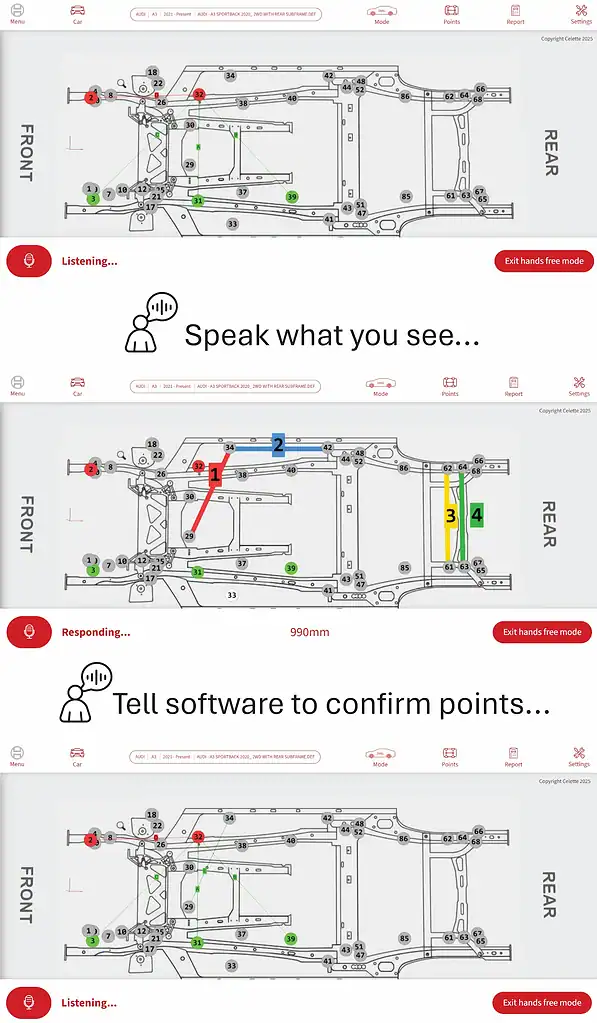
In “Hand Free Mode”, the idea is that the technician can keep both hands on the tram gauge under the vehicle while controlling the software by voice. The typical sequence you described fits this:
1. Choose hands‑free mode
- You activate a special mode where the software listens for voice input and offers possible points based on the active vehicle and measurement plan.
- The screen usually shows a list or graphic of points, but you are not required to touch the PC while under the car.
2. Speak what you see / confirm points
- You read aloud what you see on the gauge or describe the measurement reading like “1523 millimeters”).
- The software interprets this and suggests matching points on the database, then you confirm by voice which point pair you are measuring; once confirmed, it records the value and moves to the next point.
This reduces time climbing in and out from under the vehicle, lowers the chance of typing errors, and makes it easier to use the tram gauge as a true pre‑blueprinting tool.
4. Print or export the report
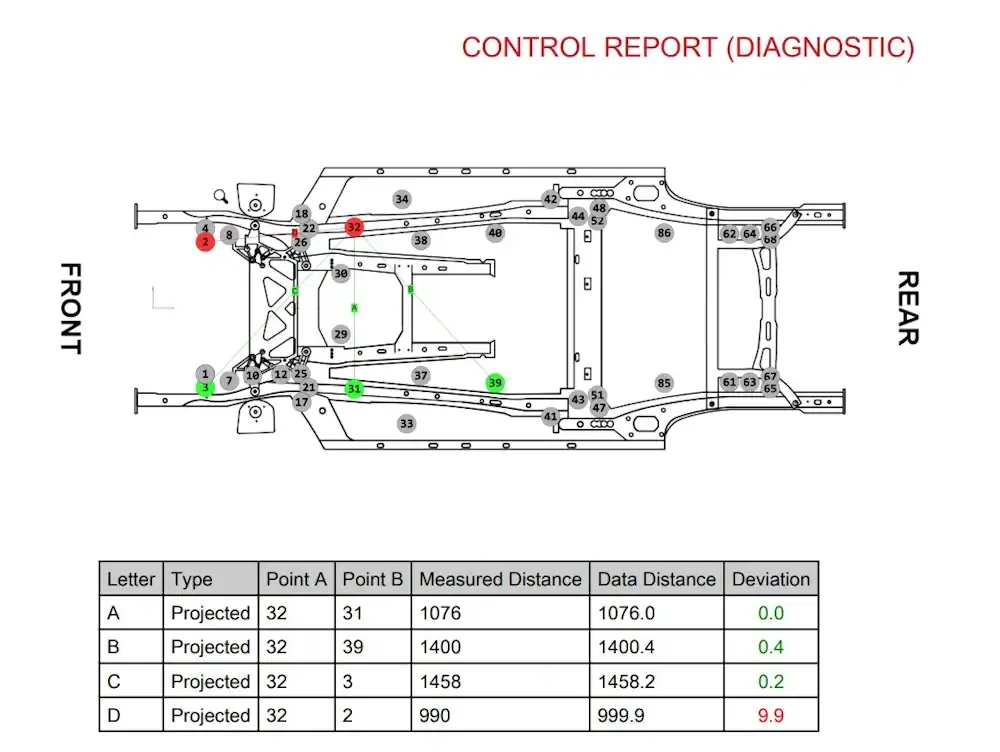
- After measuring, the software can produce a structured report showing reference values, actual values, and deviations, often with color coding for “in tolerance/out of tolerance”.
- This report can be printed or exported (PDF) as documentation for estimators, insurers, and customers, and as proof of pre‑measure and post‑repair condition.
Subscription
All-In-One Pricing
One subscription covers multiple users and all Webtools features for every compatible Celette device in your bodyshop.
Special Offer
Discounted rates available for tracking gauge-only subscriptions.
Contact us today to schedule a demo or request a quote
for your collision repair business.
Connect with CELETTE Worldwide
CHINA
-
CELETTE AUTO EQUIPMENT AND REPARATION
Room 3, 11F, Xing Hui Building, No 176, Min Yang Road, Jiaxing, 31400 Zhejiang Province / CHINA - +86 158 8831 7667
- [email protected]
FRANCE
-
CELETTE SAS
80, Impasse des Bretteaux 42410 SAINT MICHEL SUR RHÔNE FRANCE - +33 474 575 959
- [email protected]
GERMANY
-
CELETTE DEUTSCHLAND GMBH
Eugen-Ensslin-Str.3 77694 KEHL GERMANY - +49 785 195 58 712
- [email protected]
INDIA
-
CELETTE INDIA PVT LTD.
2/122 B-1, Mylampatty Road, Karayampalayam, Coimbatore 641062 / INDIA - +91 88 70 86 11 11
- [email protected]
JAPAN
-
CELETTE JAPAN TECHNICAL OFFICE
667-9 Mabashi, Shisui-Machi, Inba-Gun,Chiba 285-0914 / JAPAN - +81 70 2183 1960
- [email protected]
THAILAND
-
CELETTE ASIA PACIFIC
700/941 M.5 Amata City Chonburi Industrial Estate, Nongkakha, Phanthong 20160 Chonburi THAILAND - +66 905 630 258
- [email protected]
USA
-
CELETTE INC. TEXAS
122 Valley Ridge Blvd. Unit G Lewisville, TX 75057 / USA - 1-800-CELETTE
- [email protected]
Get in touch with us directly
Have a question or want to learn more? Drop us a message
below — we’d love to hear from you!
Have a question or want to learn more? Drop us a message below — we’d love to hear from you!
